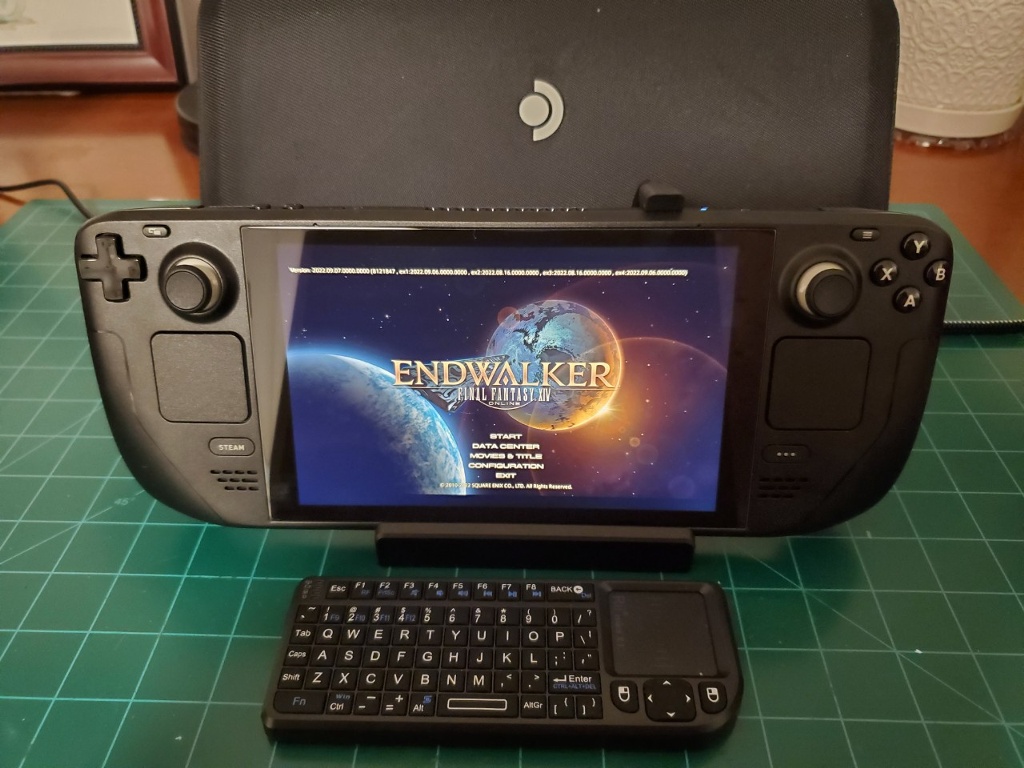

I got my Steam Deck 3 weeks ago. Unlike many people, I only had to wait for 2 months to get mine at the time. I understand there are no more wait time now.
The only reason I bought Steam Deck is to play FF14 away from my PC. Also, I wanted to start playing the game with a controller to ease my shoulder pain.
I got a 64GB version since it is cheaper to upgrade the internal SSD drive. I bought an internal 512 GB M.2 2230 SSD for $89 plus tax from eBay. I also bought a 512GB microSD card for $59 plus tax from Amazon.
Upgrading the deck was a breeze. I also installed a Banazcap screen protector, but this really hinders typing on the onscreen keyboard. I really have to press the keys hard and/or a few times in a row that I just bought Rii 2.4G Mini Wireless Keyboard with Touchpad Mouse. This is a mini size and is plug and play. I needed to buy a USB-A to USB-C adaptor when I wanted to use the deck without the docking station, but I didn’t want a Bluetooth keyboard in order to save the battery life. Also, I just needed the keyboard to write macros and simple chats, so I didn’t want to get a full-size keyboard.
Rii Mini Keyboard can get tricky with connections, but I saw a YouTube video by Mix Bag to learn how to reset using F1 key and it worked! First, turn off the keyboard. While pressing F1, turn it back on and then let the F1 key go as soon as it turns on. A very simple trick but it works.
I also got the Steam Deck’s Docking station. It was expensive for $89, but the wired internet speed is really good with the upload speed of 904.4 Mbps and download speed of 835.6 Mbps. I use CAT 8 cable with TP Link Unmanaged Ethernet Network Switch to split the ethernet traffic between my PC and the Deck.
As for the FF14 launcher, I did try the third-party launcher that is in the Discovery store. As I was reading up on the launcher, I found out that it saves the login information in a file. That was a big security risk for me. I followed their instruction to delete the text string to avoid saving the login information. The launcher worked initially, but it would have the watermark of their logo in game which I did not like. Also, it was a mess trying to login the second time. So I deleted everything and followed Brian at Ginger Prime channel in YouTube to install the official FF14 launcher using Proton-GE. It was a lot easier than I thought.
Once I got the FF14 up and running, it was time to setup a few things in order to extend the battery life. I read a lot about different ways, but I found the following works very well for me. I set the Thermal Power limit to 10 Watts. This brought down the Refresh Rate to 40 and I set the FPS to 40 as well. I also have Half Rate Shading “On” as well. This gave me about 3 hours 15 minutes of playtime from a full battery. It also takes 2 hours and 50 minutes to fully charge.
For the controller setting, I am still experimenting, but have downloaded Sidewalk’s XIV Deck Layout from the community profiles and modified it. This one has the triggers to work as the mouse right click and left click, which made it so easy to use the mouse for HUD layouts, etc. When I had the trackpad set as the mouse clicks, I slid down a lot and the position of the mouse would constantly be off. This is the only settings that I kept from this layout since I do not know how to use Action Layers yet.
As for using the controller, there is a steep learning curve. I actually created an alt and only play with Steam Deck in order to practice using the controller. Like Brian at Ginger Prime said, I need to build a muscle memory to be comfortable using it. For my main I still use mouse and keyboard, but ultimately, I want to switch over to controller.
Anyway, I am loving the fact that I can play FF14 anywhere I want in the house away from my PC. It has been a game changer.
Good to hear you got it working. I am curious what third party installer you were using. I know XIV installer saves the password if you tell it to, but you can switch that off. I leave it on since I am lazy and I use a key fob,
Yes, if you use K/M, it will take some adjusting to use the deck. Since I am a controller user, it was very easy to adjust to the deck.
Also, I never really play FF14 without it plugged in. it's just too much of a battery hog, and it's so easy to just plug it in.
Also, how is the official Dock video wise? I am thinking of getting one to use in the Gaming house with the projection screen there. It would save me from moving my computer over every time I wanted to play FF14 there.
I tried the USB c hub I have, but the HDMI port does not do a good job. I am hoping the dock will do better.
I know there are cheaper options, but I WANT the extra power brick to power the dock and not have to move it. Plus, you know, it's the official thing, . ;-)
Yuki, it was the same way with my usb hub on my projection screen. I have the screen set to 16/9 and it would not fill the whole thing with the Deck. I had thought it was an issue with the hub's HDMI port. Ugh, I was hoping the dock would have fixed the issue. Oh well, I still might get it for a dock option.